Salesforce Lightning Design System (SLDS) is a powerful tool for building interfaces quickly and consistently, even in white-label projects. Its system of components and patterns helps maintain visual and interaction consistency, accelerate implementation, and reduce design complexity across different brands or products.
However, while SLDS makes many things easier, it also imposes important limitations. It does not always provide all the components that the platform or the client may need. These constraints push design and development teams to make customization decisions. Sometimes, these decisions are necessary and strategic: they allow teams to address specific business needs and create experiences that are more aligned with the brand.
But it's not that simple. Every customized component represents a long-term commitment. When SLDS 2 arrives and component migration becomes automated, any modified elements will need to be reimplemented or manually adapted. This requires time, resources, and additional effort that could potentially have been avoided. Moreover, over-customization can fragment the user experience, reducing consistency within the Salesforce UX and creating maintainability challenges in the Salesforce UI.
That's why designing a white-label experience with SLDS is not just about branding or visual appearance. Every customization decision is strategic and can directly impact the scalability and coherence of the Salesforce UX. So, how can we evaluate each customization with the future, and SLDS 2, in mind?
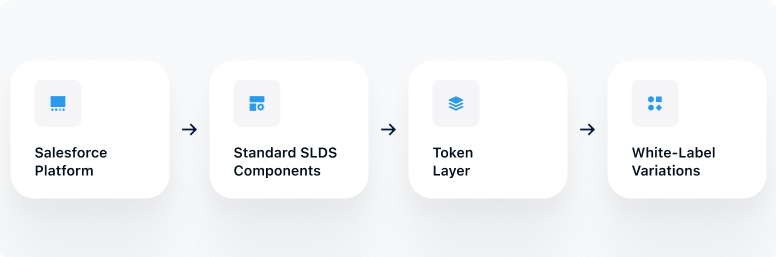
UX case: how we approached it at MUXA
Context
At MUXA, we worked with an Enterprise SaaS platform built on Salesforce that required multi-brand support, meaning it needed to serve different brands from a single platform while maintaining consistency and scalability.
Challenge
The client needed a white-label solution but was limited to Salesforce Lightning Design System (SLDS) 1. SLDS 2 was still in beta at the time of the build, and enterprise customers cannot ship on beta because of the risk of the platform changing underneath them. So the technical reality was SLDS 1, with a clear future migration to SLDS 2 already on the horizon.
The tension: SLDS 1 components are functional but often show their age. Using every default gets you a product that works but looks a decade behind. Rebuilding everything gives you the aesthetics you want but blows up the maintenance budget and closes the door on the SLDS 2 migration. The design challenge was to improve the actual product without fighting the platform's architecture, and without accumulating design debt that becomes a problem when SLDS 2 finally graduates.
Our step-by-step approach
1. Analysis
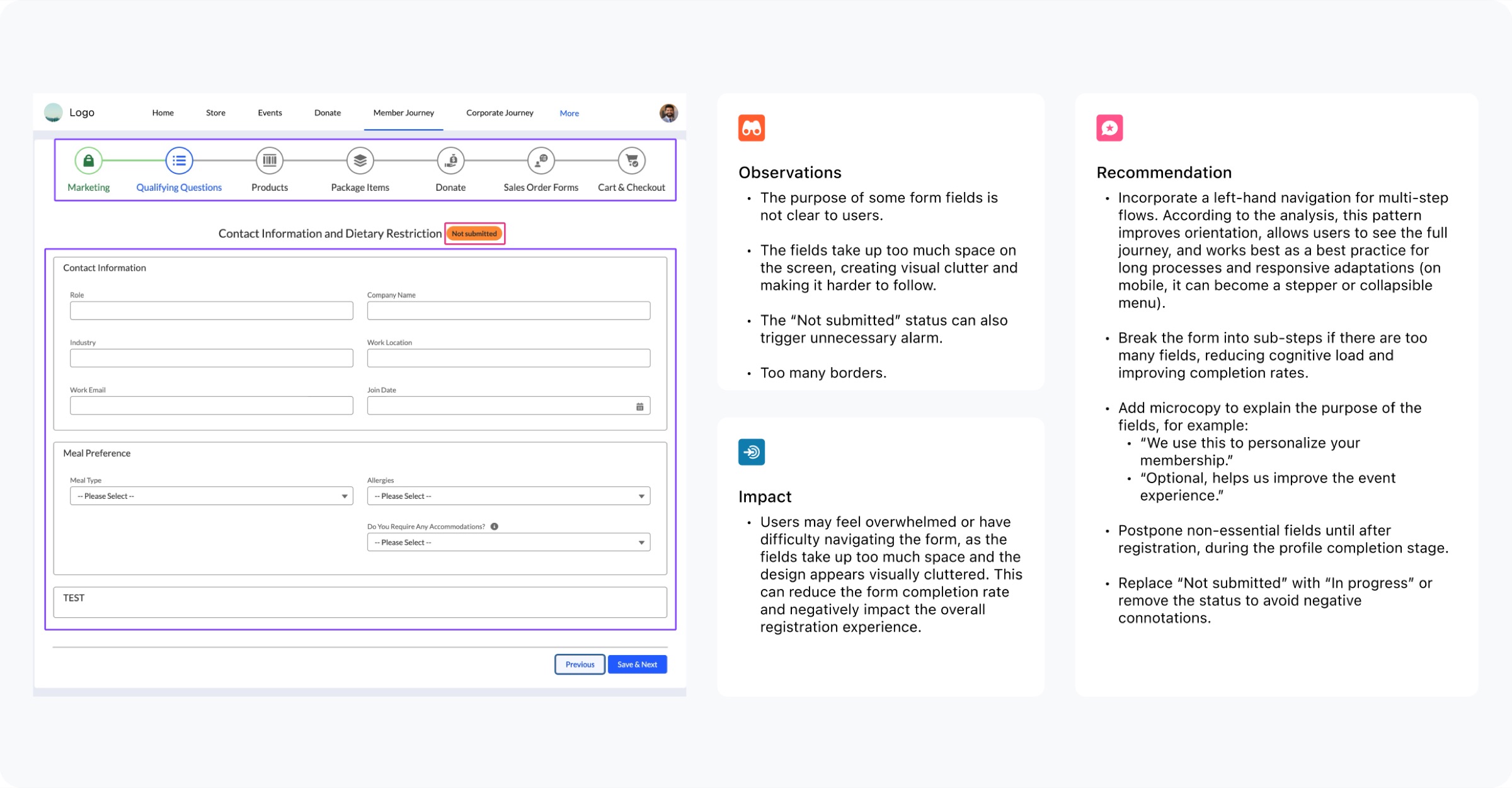
We analyzed the existing platform to understand the client's current situation and user flows. Based on this assessment, we developed recommendations and proposals to improve both UI and UX, optimizing the user experience while preparing the platform for future updates.
2. Identifying opportunities
We evaluated which elements could be preserved, which could vary by brand, and which required customization.
- Standard components were preserved whenever possible, taking advantage of automatic updates inherited from the platform.
- We clearly separated visual theming (colors, typography) from structural architecture to maintain consistency and scalability.
- Custom components were justified only when platform limitations blocked critical product or UX requirements. Less than 1% of components were customized.
3. Implementation
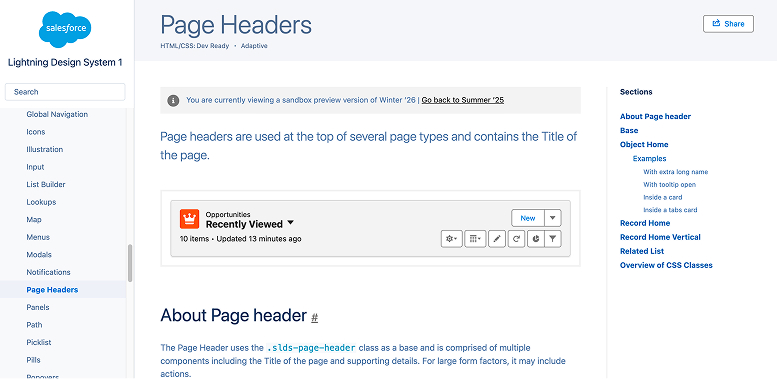
We used the Salesforce Lightning Design System in Figma as the foundation to create our own design system, documenting each component and pattern so the team could use it as a reference and guide. We consistently followed the official SLDS 1 standards, ensuring platform consistency and preparing for future migration to SLDS 2.
For the moments where we were introducing new interaction patterns, we used v0 to build interactive prototypes and hand those to the engineering team. Interactive prototypes gave engineers a clearer reference than static Figma mockups, especially for interactions that are hard to describe in words.
4. Design decisions in practice
Three examples from the build where the SLDS 1 default was not enough on its own, and we deliberately chose a different approach.
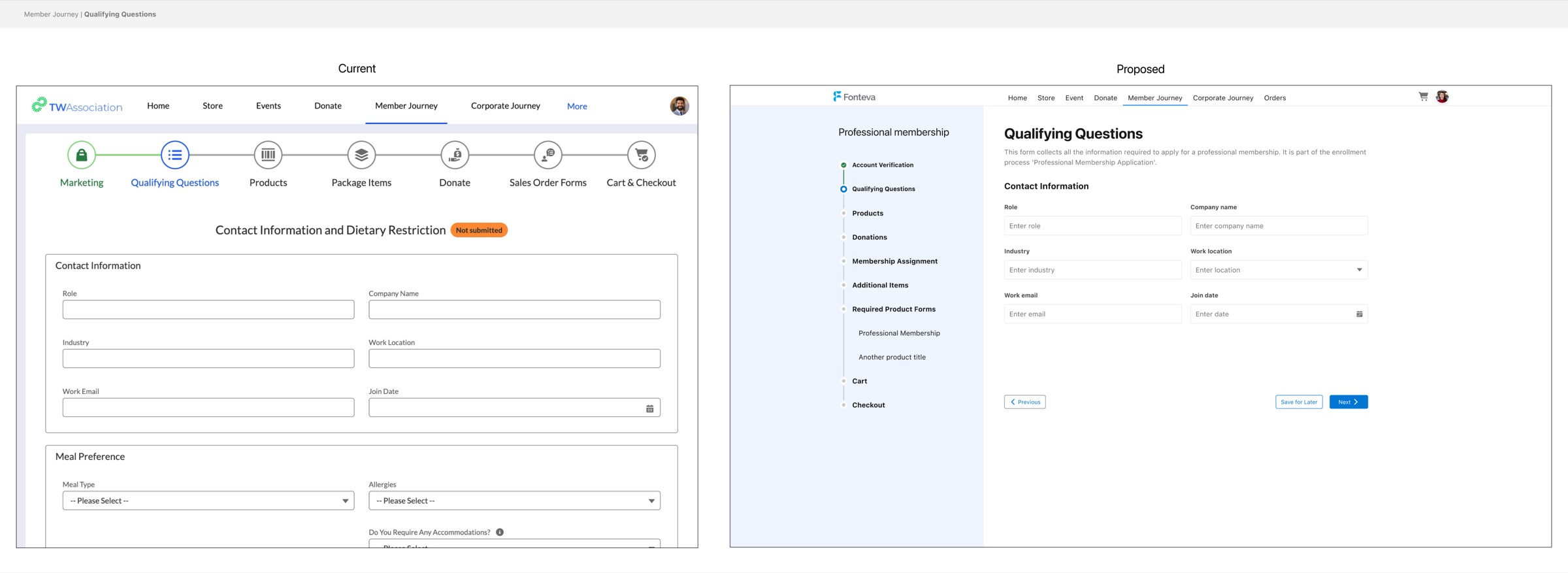
Vertical stepper with sub-steps. The original flow used a horizontal stepper with accordions inside each step to separate related fields. Horizontal steppers don't scale gracefully when the number of steps varies, and every client on the platform customizes how many steps their flow has. We replaced the horizontal stepper with a vertical stepper on the left, with sub-steps nested under each parent step. Clients could add or remove sub-steps to match their own flow. The stepper itself remained a standard SLDS 1 component.
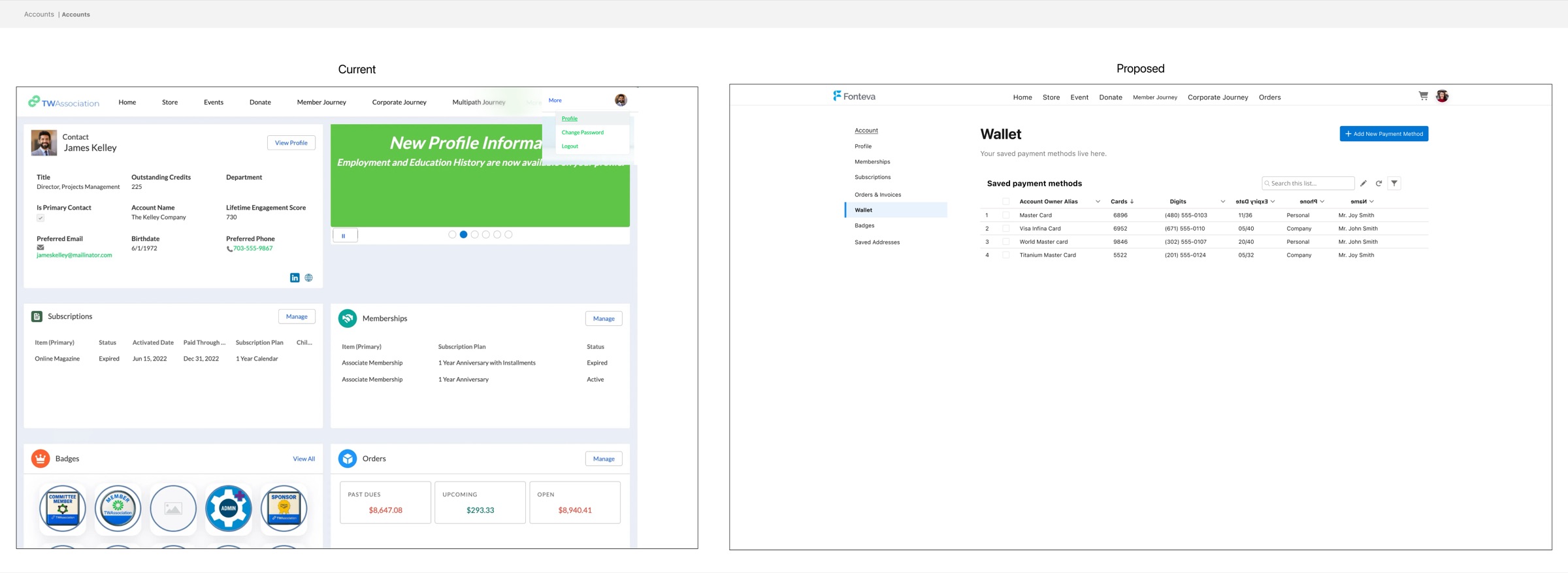
Settings page redesign. The original settings area used a widget dashboard, which works for admin metrics but not for a settings hub where the user is looking for a specific setting to change. We replaced it with a sub-navigation pattern on the left and the settings content on the right. Every element still came from SLDS 1. The change was the composition, not the parts.
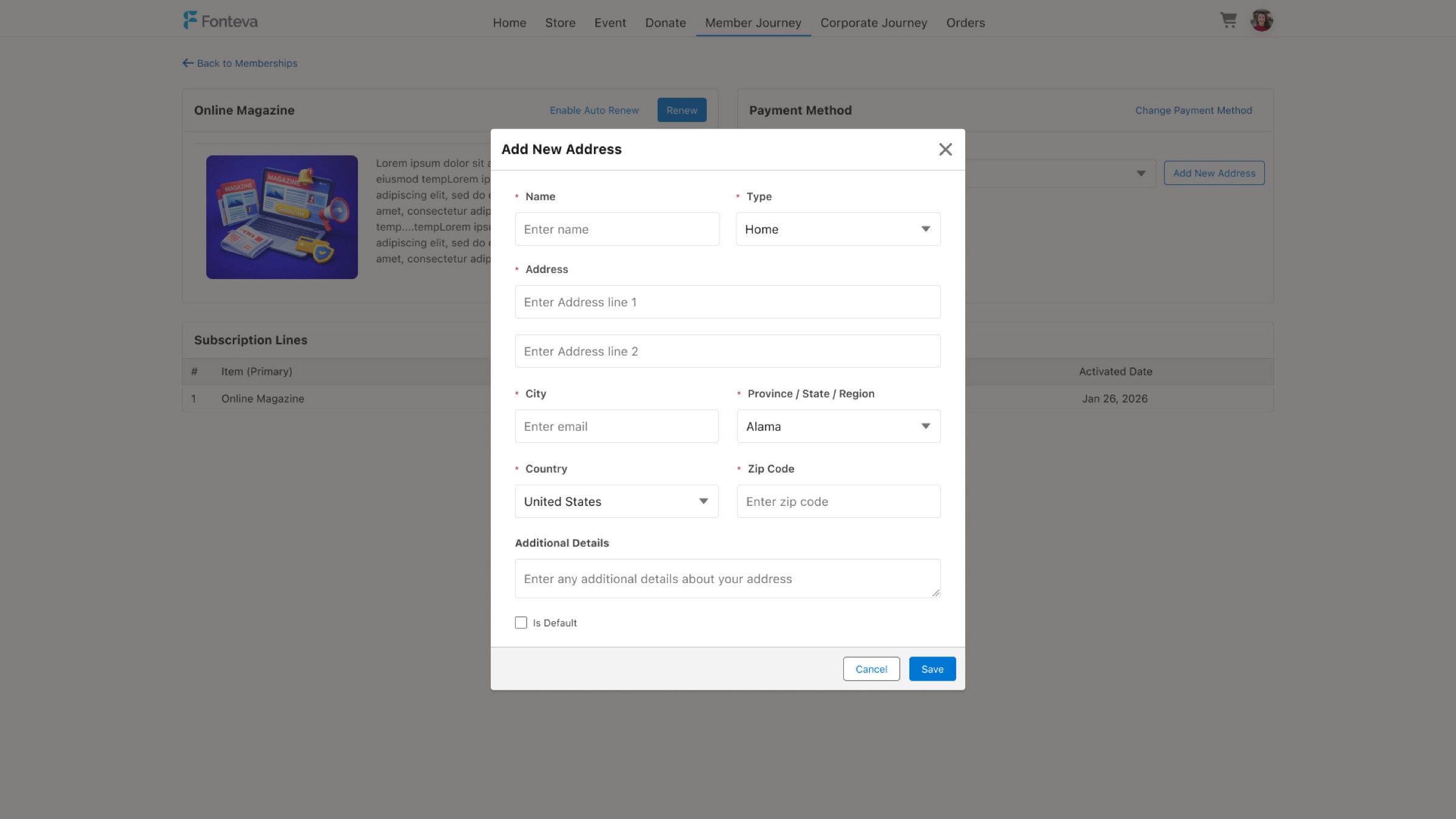
New object flow, from page to modal. By default, adding a new object in Salesforce (a new wallet, a new contact, a new address) opens a full new page. That broke the user's context every time they added something as part of a larger workflow. We moved the new-object flow into a modal, keeping the user in place while still respecting the SLDS 1 boundaries. The modal itself was a standard component. What changed was where and when it was used.
5. Collaboration and guardrails documentation
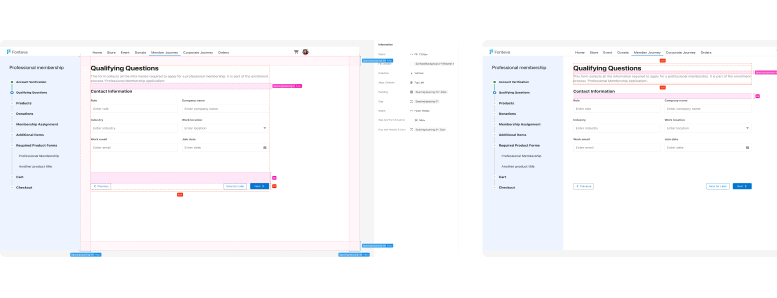
We worked closely with the development team, validating each decision and ensuring technical feasibility. At the same time, we documented the platform's structure, boundaries, and guardrails to protect long-term consistency and maintainability. This goes beyond aesthetic discipline, it's strategic architecture that allows the platform to scale and be updated safely.
6. Building the new platform
With the design system and strategic decisions validated, we built the new white-label platform, prioritizing:
- Preserving standard (OOTB) components whenever possible.
- Reducing unnecessary custom components.
- Defining layout guardrails and brand token mapping to ensure consistency.
Outcome
Thanks to this structured approach, we successfully built a scalable white-label system that maintains consistency and coherence in the user experience:
- Scalability and flexibility: The platform can adapt to different brands without compromising the integrity of the Salesforce UX or the maintainability of the UI.
- Clear path to SLDS 2: By preserving standard components and documenting guardrails, future migration will be smoother, reducing update risks and costs.
- Reduction of long-term design debt: Every customization decision was made strategically, avoiding rework and keeping the architecture clear.
- Focus on architecture and experience, not just appearance: The project prioritized structural discipline and consistent user flows over visual polish, ensuring that every change has a lasting impact.
In summary
Building a white-label solution in Salesforce is not just a branding exercise; it is a strategic product and architecture decision. Every customization should be evaluated for its impact on scalability, maintainability, and future adoption of Salesforce Lightning Design System 2.
By auditing the platform, identifying opportunities for preservation, implementing a solid design system, and documenting guardrails, you can achieve a solution that:
- Maintains Salesforce UX consistency across multiple brands.
- Minimizes design debt and reduces effort for future updates.
- Ensures a clear path to SLDS 2, avoiding technological blockers and costly rework.
- Prioritizes architecture and user experience over mere visual polish.
The key takeaway is that every customization decision should be assessed not only for its immediate impact but also for how it will affect the long-term evolution of the platform.
If you are building or modernizing a Salesforce-based platform and want a white-label system that supports the platform's evolution, we would be happy to help review and plan the right strategy.
Start a conversation with MUXA